
Mesh WiFi Support: Diagnose the Room, Not Just the Router

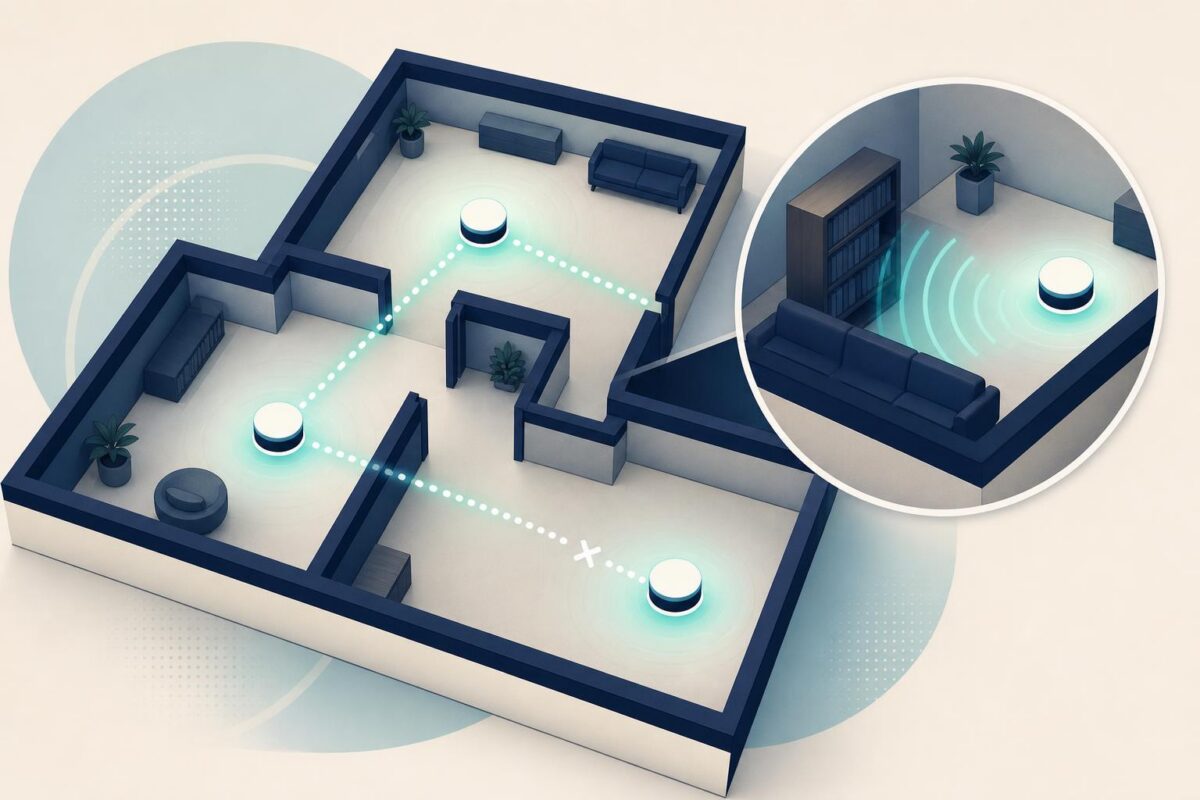
Mesh WiFi support needs to answer a location question: why does the connection work in one part of the home but fail in another? A successful test beside the main router does not resolve a bedroom complaint. Support has to understand the path between rooms, the placement of each node, and the task the customer cannot complete.
A floor-plan description by phone can be surprisingly ambiguous. Upstairs might mean directly above the router or across a long hallway. A cabinet may hide the equipment. Viewabo gives the conversation a physical reference point through visual communication. The goal is a useful placement and testing discussion, not a promise that a camera can measure radio performance.
Mesh WiFi support needs a room-by-room baseline
Begin with the failing location and one repeatable activity. Ask where the customer sits, which device they use, and what failure looks like. A dropped call, slow download, and missing network are different observations. Give each its own test instead of combining them under poor WiFi.
Next, establish a comparison location where the same device works. Keep the application and test conditions as similar as practical. Otherwise, a change in service or device could masquerade as a coverage improvement.
A simple room list is enough. Record the router room, each satellite room, and the trouble spot. Avoid collecting an unnecessary detailed map of the customer’s private home.
If every room is offline, begin with the home router’s connection path before investigating placement.
Identify the router and the satellites
Ask for a view of each unit’s exterior and its immediate surroundings. Confirm which device has the incoming connection. Then identify the satellites using the manufacturer’s names and status guidance. Similar-looking boxes can have different jobs.
NETGEAR’s 2021 mesh-system announcement describes communication between a router and satellites within a mesh system. That is the relevant principle for support: the path between nodes matters as well as the path from a node to a user’s device. More boxes alone do not explain whether that arrangement works.
Ask whether the customer recently moved a node or rearranged a room. A small furniture change can be a useful lead, but treat it as a hypothesis. The next step should test the hypothesis rather than announce it as the cause.
See the surroundings without pretending to measure signals
The visual check should establish practical facts. Is the unit enclosed? Is it next to a large metal object? Is it sitting where people accidentally disconnect it? Can the customer reach it safely? Compare the placement with the model’s installation instructions.
Do not diagnose signal strength from the picture. Walls, materials, network load, and device behavior need appropriate diagnostics. The camera helps explain the environment in which those measurements occur. It is not a replacement for them.
Our independent TP-Link support analysis explores the boundary between a connected device and the network around it.
If a permitted placement change is worth testing, move only one node. Record its old and new locations. Keep the change reversible so the customer can restore the previous arrangement if another room becomes worse.
Run a route, not a single speed test
Mesh WiFi support should test the complaint where it happens. Repeat the selected activity in the trouble room after the approved change. Then check the previously working room. An improvement that simply moves the failure elsewhere is incomplete.
Where the complaint involves moving around, test that ordinary route safely. The customer should not watch a device while walking on stairs. Choose stable stopping points and compare the experience there. Stop any demonstration that distracts from safe movement.
Document the result in customer language. For example, the call now stays connected at the kitchen table is clearer than an unexplained technical label. Do not convert one successful test into a guarantee about all rooms or all future conditions.
Explain when placement is not enough
Some homes need a different network design, an additional wired connection, or help from an installer. Other complaints originate with the internet service rather than indoor coverage. The agent should state which possibility remains open and which evidence supports the handoff.
Avoid turning every difficult room into an immediate recommendation to buy another node. First check whether the existing arrangement follows the manufacturer’s guidance and whether the problem follows the device. Purchasing decisions should come after diagnosis, not substitute for it.
If the customer rents or shares the building, confirm who can authorize equipment relocation or cabling. Mesh WiFi support must work within the customer’s actual control over the environment.
Keep the household informed
Explain the purpose of each observation before asking for it. The customer is helping compare locations, not proving that they installed something incorrectly. A neutral explanation encourages accurate descriptions of previous changes.
End with a small placement record and a clear follow-up condition. State which rooms were checked, which task passed, and what to report if the symptom returns. If the issue needs an installer, include the room-level findings so the visit has a defined objective.
Viewabo can help make these spatial details easier to discuss. The broader case for seeing rather than only describing support problems appears in why video belongs in customer support. Applied to mesh WiFi support, the principle is specific: observe the environment, test the relevant route, and verify that the household’s actual use has improved.